
One of the biggest hesitations customers have about buying online is the fear that once an order is placed, they can’t make changes. What if they ordered the wrong size? What if they want to swap a color? In a physical store, making a change before checkout is effortless but online, it often means contacting support and waiting for a response.
What if your customers could edit their own orders directly, as long as the order hasn’t shipped yet? In this tutorial, we’ll show you how to make WooCommerce “Processing” orders editable with a simple code snippet.
Understanding WooCommerce Order Statuses
WooCommerce has multiple order statuses: Pending Payment, On Hold, Processing, Completed, Cancelled, Refunded, and Failed. By default, orders are only editable when their status is “Pending Payment” or “On Hold.” Once an order moves to “Processing” (meaning payment has been received), it becomes locked.
However, there are legitimate reasons to edit a processing order. A customer might want to change a product variation (like swapping a yellow t-shirt for a red one at the same price), update shipping details, or adjust quantities — all before the order is shipped.
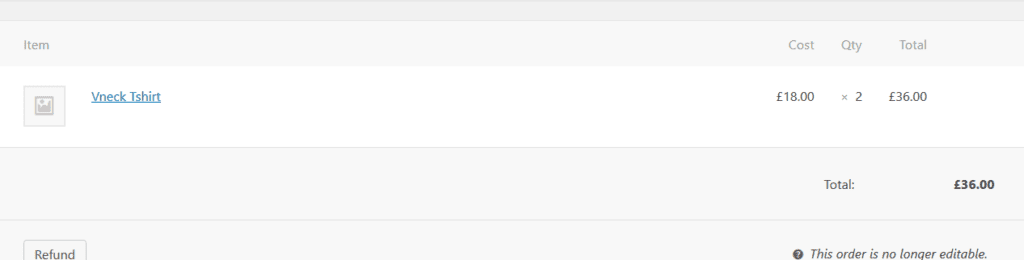
Before: Order Is Not Editable
When an order is in “Processing” status, the admin sees the message “This order is no longer editable” and there’s no way to modify the items:
Add the Code to Make Processing Orders Editable
Add the following filter to your child theme’s functions.php file:
add_filter(
  'wc_order_is_editable',
  'wc_make_processing_orders_editable',
  10, 2
);

function wc_make_processing_orders_editable(
  $is_editable, $order
) {
  if ( $order->get_status() == 'processing' ) {
    $is_editable = true;
  }
  return $is_editable;
}
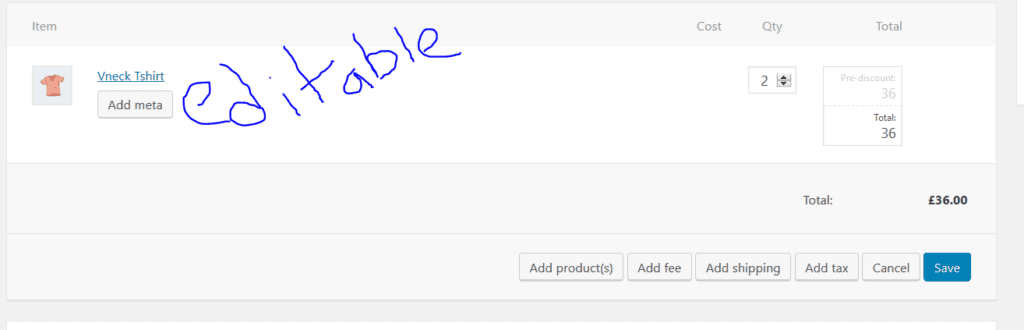
After: Order Is Now Editable
After adding the code, processing orders become editable. The admin can now modify quantities, add or remove products, add fees, shipping, and tax:
How This Code Works
The code hooks into the wc_order_is_editable filter, which WooCommerce checks to determine whether an order can be modified. By default, it returns true only for “Pending” and “On Hold” statuses. Our filter adds “Processing” to the list of editable statuses, unlocking the edit controls in the order admin screen.
Conclusion
Making WooCommerce processing orders editable is a one-filter change that can significantly improve your store’s flexibility and customer experience. It’s especially useful for stores that handle payment on delivery or invoice-based billing, where modifying an order before shipping is a natural part of the workflow.
Frequently Asked Questions
Q: Can customers edit orders themselves from their account?
This filter makes orders editable from the admin panel. Customers don’t get a front-end editing interface by default. They would need to contact you (the store admin) to request changes, and you can then edit the order from the backend.
Q: Can I make other order statuses editable too?
Yes. You can add additional status checks in the function. For example, add another condition for “Completed” orders: if ($order->get_status() == ‘completed’). However, editing completed orders is generally not recommended.
Q: What happens to the payment if I edit a processing order?
WooCommerce doesn’t automatically adjust payments when you edit an order. If the total changes, you’ll need to handle the payment difference manually — either refunding the excess or requesting additional payment from the customer.
Q: Will this survive WooCommerce updates?
Yes, as long as the code is in a child theme’s functions.php. The wc_order_is_editable filter is a stable WooCommerce API hook.