
Yes, Replit can build a WordPress plugin, because it fully supports PHP, JavaScript, CSS, and HTML, which are the exact languages every WordPress plugin is made of. With the release of Agent 4 in 2026, Replit can now write plugin code faster than ever, scaffold the correct folder structure, and even generate working hooks and shortcodes from a plain-English prompt. But here’s the honest part that’s easy to miss: writing plugin code and building a plugin that actually works reliably on a real WordPress site are two very different things. Replit is a coding workspace, not a WordPress environment, so it can produce the code but it cannot properly test how that code behaves inside WordPress. As a white label WordPress development agency that has shipped over 1,000 projects, ThemeLocation uses tools like Replit and Claude Code every day, and we can tell you exactly where they help, where they fall short, and why the code they generate still needs an experienced developer before it touches a client site.
Here’s the complete, current picture for 2026, written by people who actually build WordPress plugins for a living.
The Short Answer
Replit can write a WordPress plugin. It cannot run one.
That single distinction is the whole story. A WordPress plugin is just a package of PHP files with some CSS and JavaScript. Replit supports all of those languages, so it can create every file your plugin needs. With Agent 4, you can literally type “build me a WordPress plugin that adds a custom shortcode for a testimonial slider” and it will generate the PHP code, structure the folder, and hand you a downloadable package.
The problem is that WordPress plugins are designed to run inside WordPress. Your plugin code calls WordPress functions like add_action(), add_shortcode(), and wp_enqueue_script(). Those functions only exist when WordPress itself is running. In a standard Replit PHP project, WordPress is not running, so the plugin cannot actually execute or be tested there. It looks fine on the screen. Whether it works is a different question entirely, and one Replit can’t answer on its own.
This is why every serious plugin still needs to be tested in a real WordPress environment before it goes live. More on that in a minute.
What Replit Can Actually Do in 2026
Worth being current here, because Replit has moved fast. It now runs on Agent 4, which landed in 2026 and is a real step up from the Agent 3 version you may have used before. Agent 4 can even split a single request into parallel workstreams and stitch the results back together. For plugin work, a few things stand out.
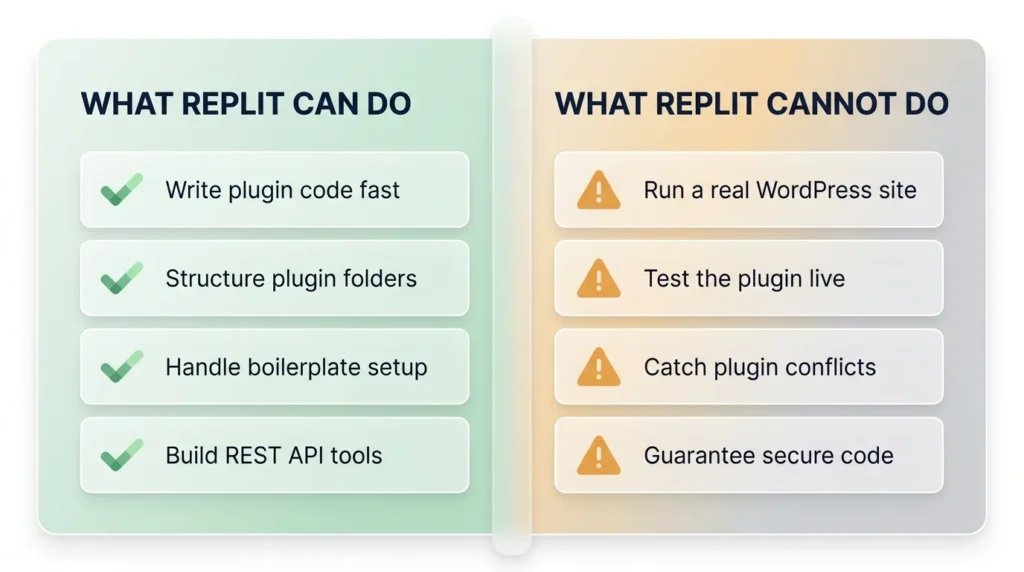
The obvious one is speed. Describe the plugin you want in plain English and Agent 4 generates the PHP hooks, the custom functions, the admin settings page, the shortcodes, whatever you asked for. A simple plugin that used to take an afternoon can come together in minutes. It also gets the folder structure right, which matters more than beginners realize. WordPress is picky about how a plugin is organized, and Replit will scaffold the main PHP file with its header comment plus the subfolders for assets and includes, so your download is ready to zip and go. All the boring boilerplate too, the activation hooks, the deactivation hooks, the little security check that stops someone loading your file directly. That part is genuinely useful.
Here’s the part that often gets overlooked, though, and it’s actually where Replit shines: decoupled tools. Instead of building a plugin that lives inside WordPress, you build a separate app on Replit that talks to WordPress through the REST API. Replit hosts the logic, WordPress stays the content backend, and the two pass data over secure HTTPS using Application Passwords or tokens. For a lot of projects that’s a cleaner setup than a traditional plugin, and it plays to what Replit is actually good at.
Round it out with solid GitHub integration for clean version control, and a newer 2026 security feature called Package Firewall that automatically blocks known-malicious packages before they hit your project. When you’re generating code with AI, that last one matters more than it sounds.
What Replit Cannot Do (The Limitations That Actually Matter)
This is the part that usually gets glossed over. So let’s be specific.
The core issue is that Replit runs standalone apps, not WordPress. There’s no Apache or Nginx web server, no MySQL database, no WordPress core sitting there for your plugin to hook into. Your plugin’s WordPress functions have nothing to talk to, so you can check that the PHP is written correctly, but you can’t confirm the plugin actually does anything. That’s not a small gap. That’s the whole point of a plugin.
The database is part of the same problem. WordPress wants MySQL or MariaDB. Replit doesn’t hand you a production-like MySQL setup. Yes, there’s a workaround floating around that uses Nix packages and SQLite to spin up a lightweight WordPress instance right inside Replit, and if you’re curious it’s a fun weekend experiment. But it’s slow, it’s fragile, and SQLite trips up plugins that expect normal MySQL behavior. Fine for tinkering. Not something I’d stake a client’s site on.
Then there’s the file system, which on Replit is ephemeral, and free Repls go to sleep after a while. WordPress plugins that write to directories, handle uploads, or manage media can behave one way on Replit and a completely different way on a live server. You won’t catch that until it’s too late.
And the big one, the thing no article really wants to say out loud: on a real site, your plugin has to get along with a theme, with WordPress core, with user roles, with a dozen other plugins, and with whatever PHP version the host is running. Conflicts are one of the most common reasons a plugin blows up in production. Replit can’t test for any of it, because there’s nothing there to conflict with.
Which brings us to AI-generated code in general, and this isn’t a Replit-specific dig, it’s true of every AI coding tool. The code usually looks right. It’s often right, for simple stuff. But it also quietly ships subtle bugs, security holes, deprecated functions, and edge cases that don’t show up until a real user hits them. Great starting point. Not a finished plugin. Someone who actually knows WordPress still has to read it, test it, harden it, and clean it up.
The Workflow That Actually Works
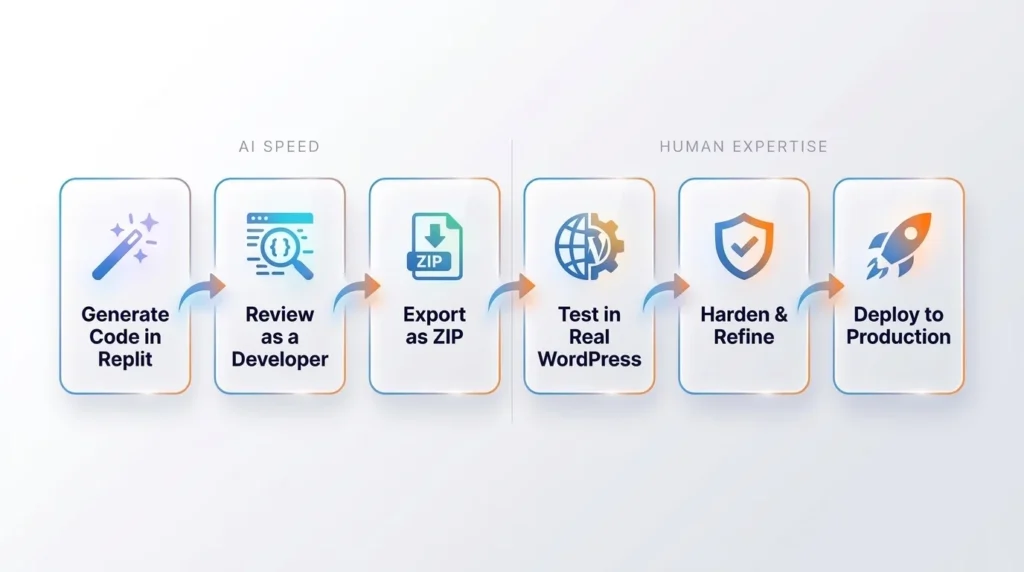
If you’re going to use Replit for WordPress plugin development, here’s the professional workflow that gets real results. This is close to how our own team uses AI tools day to day.
First, generate the code in Replit. Use Agent 4 to write the plugin logic, structure the files, and handle the boilerplate. Be specific in your prompts. The more precisely you describe what you want, the better the output.
Second, review the code as a developer, not as a user. Read through what the AI generated. Check that it uses current WordPress functions, follows security best practices like sanitizing inputs and escaping outputs, uses nonces for form submissions, and doesn’t include deprecated code. This step is where experience matters most. If you can’t read PHP and don’t know WordPress conventions, you can’t do this step, and that’s exactly where plugins go wrong.
Third, export the plugin as a ZIP file, or push it to GitHub.
Fourth, test in a real WordPress environment. Install the plugin on a local WordPress setup using a tool like LocalWP, XAMPP, or Docker, or upload it to a private staging site. This is where you actually find out whether the plugin works. Activate it. Test every function. Check for conflicts with common themes and plugins. Test on multiple PHP versions.
Fifth, harden and refine. Fix the bugs you found. Add proper error handling. Optimize any slow queries. Make sure the plugin fails gracefully. Test again.
Sixth, deploy to production only after all of that is done.
The pattern is simple. Replit for speed on the writing phase. A real WordPress environment for testing. An experienced developer connecting the two. Skip the middle steps and you get a plugin that works in a demo and breaks on a client’s live site.
Why AI-Built Plugins Still Need a Real Developer
Let’s be honest about something the AI hype tends to skip. The reason WordPress powers a huge share of the web is that its plugin ecosystem is deep, mature, and unforgiving of sloppy code. A badly built plugin doesn’t just fail. It can slow down an entire site, open security vulnerabilities, break during WordPress updates, conflict with other plugins, and lose data.
AI tools like Replit and Claude Code are genuinely useful. We use them. They make good developers faster. What they don’t do is turn a non-developer into a plugin engineer, and a few reasons explain why.
Start with context, because AI has none of yours. It doesn’t know which other plugins are installed, what the hosting looks like, which PHP version the client is stuck on, or how much traffic the site takes. It writes generic code for a generic case, then you find out the specifics didn’t fit.
It also makes confident mistakes, which are the worst kind. The code comes back looking completely professional with a security hole sitting right in the middle of it that a trained developer would catch on sight. Input sanitization, output escaping, SQL injection prevention, proper capability checks. These are exactly the things AI tends to get subtly, dangerously wrong.
And it never tests anything in the real world. It can’t tell you the plugin fights with the client’s page builder, or falls apart on their multisite setup, or quietly adds two seconds to their checkout. You only learn that by running it somewhere real. It won’t maintain the thing either. WordPress updates roll out constantly, PHP versions shift, and a plugin that’s perfect today can break by next quarter. Keeping it alive takes a human who understands the code.
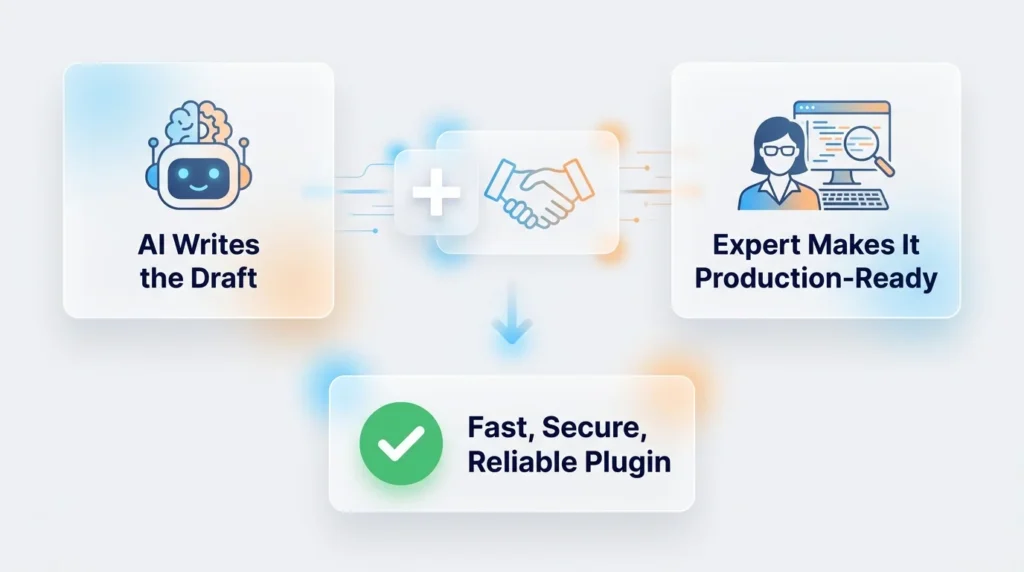
This is the whole reason businesses come to a specialized agency instead of pushing AI output straight to production. If you want a plugin that’s fast, secure, doesn’t fight with anything, and survives the next WordPress update, you need someone who can take that rough AI draft and turn it into something production-grade. That’s the gap between a plugin that demos beautifully and one that quietly runs a business for years without anyone thinking about it. It’s exactly the kind of work our Replit developers handle every day.
When Replit Is a Good Fit for Your Plugin Project
To be fair, there are real situations where Replit is a smart choice, and I’d recommend it in a heartbeat for some of them.
If you’re learning, it’s fantastic. You get to practice writing hooks and understanding how a plugin is put together without wrestling with local server installs first. If you’re prototyping an idea and just want to see if the concept holds up before committing real time to it, Replit gets you a rough version fast. If you’re building one of those decoupled REST API tools I mentioned earlier, it’s arguably the best fit going, since that’s exactly where Replit’s strengths lie. And if you’re passing early-stage code back and forth with a teammate or a client, the browser-based collaboration makes that painless.
For all of that, Replit earns its spot in the toolkit. No argument here.
When You Should Bring in a Professional Instead
Now the flip side, which matters just as much. Some plugins have no business being shipped on AI-generated code alone.
Anything customer-facing or mission-critical is the clearest case. One subtle bug or security hole and you’ve got a real problem on your hands, so that code needs expert eyes before it goes anywhere near production. Same goes double for anything touching payments, personal data, or sensitive business logic, where “mostly secure” isn’t good enough. And once a plugin has to integrate deeply with WooCommerce, a membership system, or some finicky third-party API, the edge cases pile up fast and AI simply won’t catch them all.
Then there’s the long game. WordPress ships core updates constantly and PHP versions keep moving, so a plugin that works today can quietly break in six months. That needs a human who owns the codebase and keeps it healthy. And if you’re an agency putting your own brand on the work, well, the quality bar is your reputation, and rough AI code without expert refinement is a gamble with your name on it.
For any of these, the move is the same: let AI do the fast part behind the scenes, and put a real WordPress developer or agency in charge of the finished product.
Bottom Line
Can Replit build a WordPress plugin? Yes, it can write the code, structure the files, and with Agent 4 do it faster than ever in 2026. What it can’t do is test that plugin inside a real WordPress environment, catch the security and conflict issues that only show up in production, or turn AI-generated code into a polished, maintainable product on its own.
Use Replit for what it’s good at. Writing code quickly, learning, prototyping, and building REST API tools. Then bring in a real WordPress environment for testing and a real developer for the review, hardening, and maintenance that separate a demo from a dependable plugin. AI has made plugin development faster. It hasn’t made experienced WordPress developers optional. If anything, it’s made the developer who knows how to review and refine AI output more valuable than ever.
Frequently Asked Questions
Can I install WordPress on Replit?
Not properly. Replit does not run a standard WordPress server with Apache or Nginx and MySQL. There is an experimental workaround using Nix packages and SQLite to spin up a lightweight WordPress instance, but it’s unreliable, not performant, and unsuitable for production work. For real testing, use a local tool like LocalWP or a staging site instead.
Does Replit Agent 4 write good WordPress plugin code?
Agent 4 writes plugin code quickly and handles structure and boilerplate well. The code is a strong starting point, especially for simple plugins. However, AI-generated code can contain subtle security flaws, deprecated functions, and edge-case bugs that require an experienced WordPress developer to catch and fix before the plugin is production-ready.
Can Replit test a WordPress plugin?
No. Replit can check PHP syntax but cannot run a plugin inside WordPress, because WordPress functions like add_action() and wp_enqueue_script() only work when WordPress itself is running. You must export the plugin and test it in a real WordPress environment such as LocalWP, XAMPP, Docker, or a staging site.
Is Replit good for beginners learning WordPress plugin development?
Yes. Replit is a great learning environment because it removes the setup hassle of installing local server software. Beginners can focus on writing PHP, understanding WordPress hooks, and learning plugin structure. Just remember that testing still requires a real WordPress environment beyond Replit.
Should I trust an AI-generated WordPress plugin on a live client site?
Not without expert review. AI tools generate code that often looks correct but can hide security vulnerabilities, performance problems, and conflicts with themes or other plugins. For any customer-facing or business-critical plugin, have an experienced WordPress developer review, test, and harden the code before it goes live. This is exactly the kind of work a specialized white label WordPress agency handles.
What’s the difference between building a plugin in Replit and building a REST API tool in Replit?
A traditional plugin runs inside WordPress and depends on WordPress functions, which Replit can’t run. A REST API tool is an external app hosted on Replit that connects to WordPress from the outside over HTTPS. Replit is actually better suited to the second approach, since it plays to Replit’s strength as a standalone app host rather than fighting its lack of a native WordPress environment.