

WooCommerce lets you create external/affiliate products, items that are listed on your store but sold on another website like Amazon, eBay, or a partner’s site. When a customer clicks the “Buy Product” button, they’re redirected to the external URL.
The problem? By default, WooCommerce opens these external links in the same browser tab. This navigates customers away from your site entirely. If they don’t complete the purchase on the external site, they may never come back to your store.
In this tutorial, we’ll fix this using the free WooCommerce Improved External Products plugin, which makes affiliate product links open in a new tab automatically.
Step 1: Download the Plugin
Download the plugin from the WordPress repository:
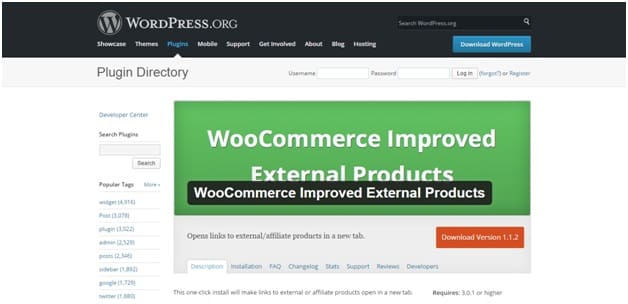
You can download it directly from: wordpress.org/plugins/woocommerce-improved-external-products
Step 2: Install and Activate the Plugin
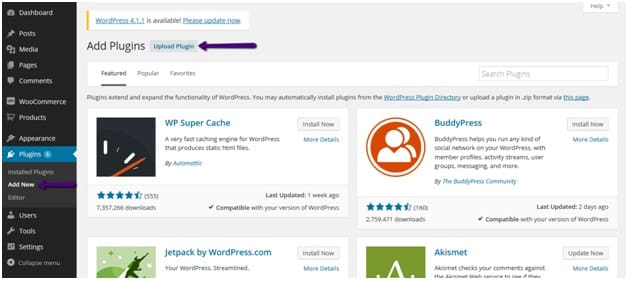
In your WordPress admin, go to Plugins → Add New and click the Upload Plugin button:
Browse for the downloaded ZIP file and click Install Now:
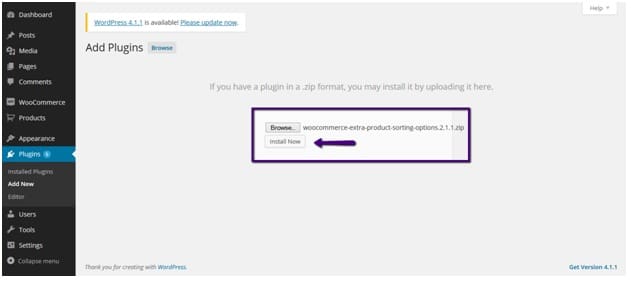
After installation completes, click Activate Plugin. That’s all the setup needed — the plugin works immediately with no configuration required.
Step 3: Set Up an External/Affiliate Product
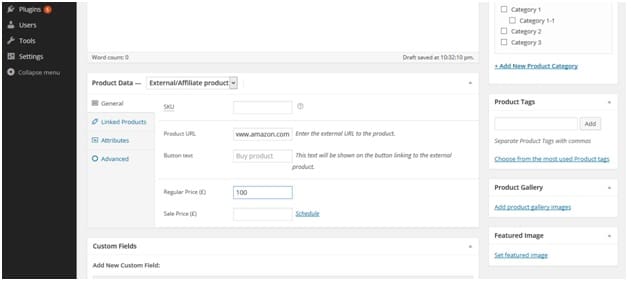
If you haven’t created an external product yet, go to Products → Add New and set the Product Data type to External/Affiliate product. Fill in the product URL, button text, and price:
Step 4: See the Result
Go to your shop page. The external product will display with the “Buy Product” button. Now when a customer clicks it, the link opens in a new browser tab — keeping your store open in the original tab:
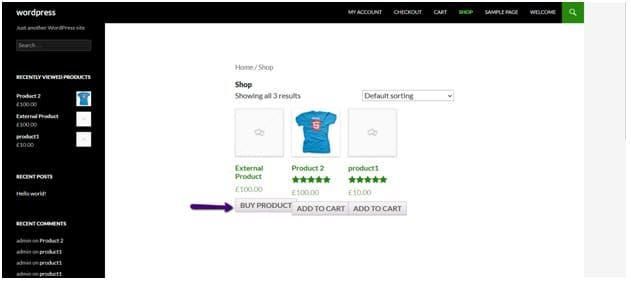
This works on both the shop archive page and the single product page. Clicking the button opens the external URL (e.g., Amazon) in a new tab while your store remains open in the background.
Why This Matters for Affiliate Sites
Keep visitors on your site: Customers can browse the external product and still have your store open to continue shopping.
Better conversion tracking: With your site still open, customers may return to compare products or add more items.
Lower bounce rate: Opening in the same tab counts as a site exit. A new tab keeps the session alive.
Professional experience: Most modern affiliate sites open external links in new tabs — customers expect this behavior.
Conclusion
Opening external/affiliate product links in a new tab is a small fix that has a big impact on your affiliate store’s user experience. The WooCommerce Improved External Products plugin handles this automatically with zero configuration. Just install, activate, and you’re done.
Frequently Asked Questions
Q: Does this plugin require any configuration?
No. Once installed and activated, it automatically makes all external/affiliate product links open in a new tab. There are no settings to configure.
Q: Does it work on both archive and single product pages?
Yes. The plugin adds the new-tab behavior to the Buy Product button wherever it appears — shop pages, category pages, search results, and single product pages.
Q: Will this affect regular (non-external) products?
No. The plugin only targets external/affiliate product types. Regular simple, variable, and grouped products are unaffected — their Add to Cart buttons work normally.
Q: Can I achieve this without a plugin?
Yes. You can add target=”_blank” to the external product link by filtering the woocommerce_loop_add_to_cart_link hook in your functions.php. However, the plugin handles this cleanly across all contexts without any code.