
When a customer adds a product to their cart in WooCommerce and then returns to the same product page, the Add to Cart button still shows the same default text. There’s no visual indication that the product is already in the cart. This can lead to duplicate additions and a confusing shopping experience.
In this tutorial, we’ll change the Add to Cart button text to “Already in Cart – Add Again?” when a product is already in the cart. This works on both single product pages and archive (shop/category) pages.
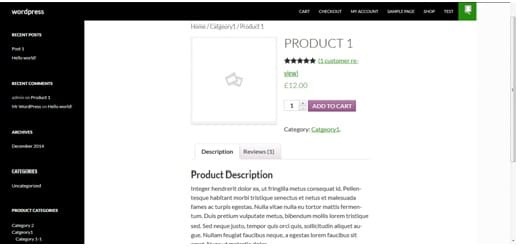
The Default Single Product Page
Here’s a standard WooCommerce single product page. The button shows “Add to Cart” regardless of whether the product is already in the cart:
Add the Code for Single Product Pages
Add the following code to your child theme’s functions.php file. This changes the button text on single product pages:
add_filter(
  'woocommerce_product_single_add_to_cart_text',
  'woo_custom_cart_button_text'
);

function woo_custom_cart_button_text() {
  foreach ( WC()->cart->get_cart()
    as $cart_item_key => $values ) {
    $_product = $values['data'];
    if ( get_the_ID() == $_product->get_id() ) {
      return __(
        'Already in Cart - Add Again?',
        'woocommerce'
      );
    }
  }
  return __( 'Add to Cart', 'woocommerce' );
}
Add the Code for Archive (Shop/Category) Pages
To also change the button text on shop and category pages, add this second snippet:
add_filter(
  'woocommerce_product_add_to_cart_text',
  'woo_archive_custom_cart_button_text'
);

function woo_archive_custom_cart_button_text() {
  foreach ( WC()->cart->get_cart()
    as $cart_item_key => $values ) {
    $_product = $values['data'];
    if ( get_the_ID() == $_product->get_id() ) {
      return __(
        'Already in Cart',
        'woocommerce'
      );
    }
  }
  return __( 'Add to Cart', 'woocommerce' );
}
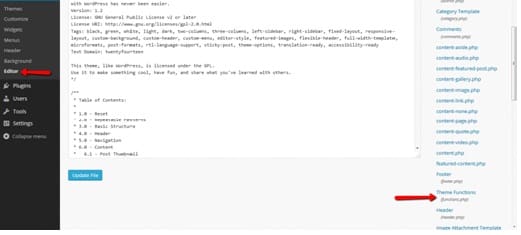
You can access the functions.php file via Appearance → Editor and selecting Theme Functions:
The Result
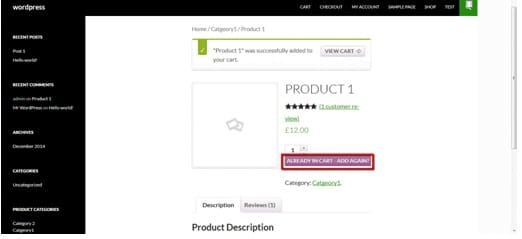
After saving and refreshing the product page, the button now shows “Already in Cart – Add Again?” for products that are already in the cart:
How This Code Works
Both functions loop through all items currently in the WooCommerce cart. For each item, they compare the product ID in the cart with the current product’s ID (using get_the_ID()). If there’s a match, the function returns the custom “Already in Cart” text. If no match is found, it returns the default “Add to Cart” text.
The two filters target different contexts: woocommerce_product_single_add_to_cart_text controls the button on single product pages, while woocommerce_product_add_to_cart_text controls the button on archive/shop pages.
Conclusion
Showing customers that a product is already in their cart is a simple UX improvement that reduces confusion and accidental duplicate purchases. Two small snippets in functions.php give you dynamic button text on both single product and archive pages — no plugin needed.
Frequently Asked Questions
Q: Does the button still add the product to cart?
Yes. The button functionality is unchanged — only the text is different. Clicking “Already in Cart – Add Again?” still adds another unit of the product to the cart.
Q: Does this work with variable products?
The single product filter works with variable products. However, the archive page filter may not detect specific variations since archive pages show the parent product. The button text will change if any variation of the product is in the cart.
Q: Will the text update immediately via AJAX?
The text updates on page load/refresh. If a product is added via AJAX without a page reload, the button text won’t change until the page is refreshed. For real-time AJAX updates, you’d need additional JavaScript.
Q: Can I change the button color when the product is in cart?
Yes. You can add a CSS class conditionally in the function and then style it with CSS. Alternatively, use the existing button text as a CSS selector using an attribute selector.